Namaskar Dosto,
In previous artical i discussed about The internetworking problem.For networking we also need IP addresses inspite of networking technology.What is IP address? This is the main concern of this artical.I will discuss something about IP address.
IP addresses:- For any host, computer on a TCP/IP network, a unique id (32 bits in IPv4) written as a collection of 4 decimal numbers (dotted quad) between 0 to 255.
Ex. IP address: 132.64.48.56. Every device must have a unique IP address. All devices pertaining to a common network must reflect a common network portion of address that must be registered with the Internet community provided by some Internet Service Provider (ISP)
IP address class:
Class A: 0 + 7 network ID bits + 24 host ID bits
Class B: 10 + 14 network ID bits + 16 host ID bits
Class C: 110 + 21 network ID bits + 8 host ID bits
Class D: 1110 + 28 multicast address bits
Address formats:
network. local.local.local (for class A IDs)
network.network.network.local (for class C IDs)
IP address of a device MAC address (physical ID)
MAC address is a permanently stamped address. IP address is stored in a configuration file in the local disk.
Subnets:
A single network may be split into a multiple networks for internal use but appear as a single network to outsider. This is the concept of subnets.
Subnet mask:- An address such that when added to network address (in bitwise-and) splits the address into network + subnet + host address.
e.g. IP address: 12.11.10.9 subnet mask 255.254.0.0
Since the leading bit begins with 0, it’s a Class A network with address 12.0.0.0
00001100 00001011 00001010 00001001 IP
+ 11111111 11111110 00000000 00000000 Subnet
___________________________________________
00001100 00001010 | 00000000 00000000
Network is extended by 7 more bits. Therefore, this is subnet 10.
The remaining host part is 0.1.10.9 is the host address.
IP and subnet masks are often presented together in this format. e.g. Network address = 154.4.32.0 , subnet mask = 255.255.224.0. In this case, the network address can be written as 154.4.32.0/19
indicating subnet has 19 bits for the network portion of address, and has remaining 13 bits for host part.
Therefore, total number of subnets = -2 = 6
Total numbe of hosts per subnet =
Classless Interdomain Routing (CIDR)
Classfull addresses waste a lot of addresses. Ideally, we could bunch similar network addresses together and reduce ARP table considerably. For a good example, see Tanenbaum
Some distinct networks:
a. 127.0.0.0 is used for loop-back address (typically in the form of 127.0.0.1)
b. When host address is either all 0s (4.2BSD) or all 1s (Unix OS standard), it’s considered a broadcast message.
c. For mobile objects, two addresses: Home address (permanent), and a care-of address. Used only for forwarding IP datagrams and admin functions. Higher layers never use them.
d. Care-of addresses two types: Foreign agent address, and Co-located care of address where mails are sent directly to the device on a foreign net.
TCP/IP includes a protocol suit ARP (Address Resolution Protocol) to map IP addresses to physical addresses by network administrators. The constructed table is called ARP cache.
RARP = Reverse Address resolution Protocol permits the inverse mapping from MAC to corresponding IP address. Hosts such as diskless workstations only knows their MAC addresses when booted but not their IP addresses. This must be obtained from an RARP server source. (RFC 903 for details).
Ok friends......i hope u get this artical.leave your comments.I need your support to share something useful.
Thanks for visiting.................



The Internetworking Problem.....
Hello friends,
In this artical i will discuss internetworking problem.As we all know internet become a main part of everyone's life.Without it we suffer much in today.As a mca student it become my soul.What problem face by us during networking.I am here to discuss that major problem.
Problem:- How to interconnect different networks together?
Look into IP, TCP, end-to-end issues.
The Internetworking Problem. Many different networks.
Link heterogeneity issue. Single-link LANs do not scale well over hundreds of miles distances. LAN switching for unknown destination implies broadcasting, a poor scheme in large nets.
Link technology: LANs, point-to-point, Packet radio, wireless, satellites. An extremely heterogeneous community.
Challenge: Design a scalable network infrastructure that connects different types of smaller networks enabling packet flows between hosts across different nets.
Issues to reckon:
■ Addressing: Each net may have its own addressing approach. Ethernet uses 6-byte ID, Telephone uses 10-digit numbers.
Gateways:
Primarily a protocol converter. It interfaces distinct networks with different characteristics.
Two types: Translation GW, and Unified Network Layer.
Translation-based Gateways: translates packet headers and protocol from one network to another seamlessly.
Problems:
a. Feature deficiency: Not all features are “preserved” as one moves from one net to another. Not all features are supported by the translation.
b. Poor scalability: Translation = where is the number of networks connected. Untenable at large networks
Internet Design principles:
Identify key parameters (a small number) which must be preserved through translation. All hosts and networks must implement them. Check the seminal paper: “End-to-end arguments” http://www.reed.com/Papers/EndtoEnd.html
Universality principles:
U1. IP-over-everything. A standard network protocol IP would be used as Internet Protocol. Must have a standard well-defined addressing convention. Then scaling is not an issue.
U2. Best-effort service model. All packets are treated alike, if any gets lost address this at the end, not inside the network to recover it. (Increases scalbility and throughput)
U3. End-to-end arguments. Keeps the interior of the network as simple as possible. Move all controls for reliability, congestion control etc. at the end-hosts. TCP functionality removed from Gateways.
Robustness principle:
R1. Soft-state inside the network. Refresh soft-states such as Router tables as often as possible. Thus, even if it gets lost once in a while, it’s no big deal.
R2. Fate sharing. Even if a GW crashes, the end-to-end communication must continue. The GW state is a soft-state, and it shouldn’t share its fate with end-hosts.
R3. Conservative-transmission/Liberal reception. Be conservative in what you send, be liberal in what you receive. What does a TCP sender do when it sees an ACK for a message it didn’t expect?
Weaknesses:-
Internet architecture has its own weaknesses.
■ Architecture relies heavily on the trustworthiness of end-systems. How does one build a trusted networks when hosts (or a subset of them) couldn’t be trusted?
■ Greedy sources aren’t handled well. TCP does a good job in sharing its bandwidth, but more and more traffic isn’t TCP
■ Security issues have been neglected
■ Administration and management tools are not all that matured
■ Incremental deployment. Not a fundamental problem, but ought to be recognized by every protocol designer.
■ Bandwidth and Latency: Link bandwidth would vary from net to net from bits/sec to Gb/sec. Latencies can be from μs to several secs.
■ Packet size: In general varies between networks
■ Loss rates & QoS: All networks vary considerably in these. These depend on traffic volume, congestion, service demands, …
■ Packet routing: Routing of packets may be handled differently by different nets.
The original TCP/IP (Cerf & Kahn).
■ Key idea. Gateways. Reject translation in favor of gateways.
■ IP over everything.
■ Standard packet header format
■ Gateways perform fragmentation, reassembly at end-hosts
■ TCP: Process-level communication via TCP, a reliable, in-order, byte-stream protocol. Original TCP did reassembly; now it’s done at the receiver. TCP and IP were tightly interwined originally, now they are separate.
■ How to launch/sustain/deliver multiple TCP between two processes? Original design didn’t consider this.
1. Use same IP packet for multiple TCP segments?
2. Use different IP packets for different segments?
■ 2 is simpler than 1. It’s easier to demux and out-of-order packets are difficult to handle in 1. Demux key is the port number of the receiving process.
■ Sliding window, cumulative ACK-based ARQ protocol.
■ Window-based flow control
■ Heavily dependent on connection setup and release scheme.
■Way off the mark on accounting issues
■One line summary
In this artical i will discuss internetworking problem.As we all know internet become a main part of everyone's life.Without it we suffer much in today.As a mca student it become my soul.What problem face by us during networking.I am here to discuss that major problem.
Problem:- How to interconnect different networks together?
Look into IP, TCP, end-to-end issues.
The Internetworking Problem. Many different networks.
Link heterogeneity issue. Single-link LANs do not scale well over hundreds of miles distances. LAN switching for unknown destination implies broadcasting, a poor scheme in large nets.
Link technology: LANs, point-to-point, Packet radio, wireless, satellites. An extremely heterogeneous community.
Challenge: Design a scalable network infrastructure that connects different types of smaller networks enabling packet flows between hosts across different nets.
Issues to reckon:
■ Addressing: Each net may have its own addressing approach. Ethernet uses 6-byte ID, Telephone uses 10-digit numbers.
Gateways:
Primarily a protocol converter. It interfaces distinct networks with different characteristics.
Two types: Translation GW, and Unified Network Layer.
Translation-based Gateways: translates packet headers and protocol from one network to another seamlessly.
Problems:
a. Feature deficiency: Not all features are “preserved” as one moves from one net to another. Not all features are supported by the translation.
b. Poor scalability: Translation = where is the number of networks connected. Untenable at large networks
Internet Design principles:
Identify key parameters (a small number) which must be preserved through translation. All hosts and networks must implement them. Check the seminal paper: “End-to-end arguments” http://www.reed.com/Papers/EndtoEnd.html
Universality principles:
U1. IP-over-everything. A standard network protocol IP would be used as Internet Protocol. Must have a standard well-defined addressing convention. Then scaling is not an issue.
U2. Best-effort service model. All packets are treated alike, if any gets lost address this at the end, not inside the network to recover it. (Increases scalbility and throughput)
U3. End-to-end arguments. Keeps the interior of the network as simple as possible. Move all controls for reliability, congestion control etc. at the end-hosts. TCP functionality removed from Gateways.
Robustness principle:
R1. Soft-state inside the network. Refresh soft-states such as Router tables as often as possible. Thus, even if it gets lost once in a while, it’s no big deal.
R2. Fate sharing. Even if a GW crashes, the end-to-end communication must continue. The GW state is a soft-state, and it shouldn’t share its fate with end-hosts.
R3. Conservative-transmission/Liberal reception. Be conservative in what you send, be liberal in what you receive. What does a TCP sender do when it sees an ACK for a message it didn’t expect?
Weaknesses:-
Internet architecture has its own weaknesses.
■ Architecture relies heavily on the trustworthiness of end-systems. How does one build a trusted networks when hosts (or a subset of them) couldn’t be trusted?
■ Greedy sources aren’t handled well. TCP does a good job in sharing its bandwidth, but more and more traffic isn’t TCP
■ Security issues have been neglected
■ Administration and management tools are not all that matured
■ Incremental deployment. Not a fundamental problem, but ought to be recognized by every protocol designer.
■ Bandwidth and Latency: Link bandwidth would vary from net to net from bits/sec to Gb/sec. Latencies can be from μs to several secs.
■ Packet size: In general varies between networks
■ Loss rates & QoS: All networks vary considerably in these. These depend on traffic volume, congestion, service demands, …
■ Packet routing: Routing of packets may be handled differently by different nets.
The original TCP/IP (Cerf & Kahn).
■ Key idea. Gateways. Reject translation in favor of gateways.
■ IP over everything.
■ Standard packet header format
■ Gateways perform fragmentation, reassembly at end-hosts
■ TCP: Process-level communication via TCP, a reliable, in-order, byte-stream protocol. Original TCP did reassembly; now it’s done at the receiver. TCP and IP were tightly interwined originally, now they are separate.
■ How to launch/sustain/deliver multiple TCP between two processes? Original design didn’t consider this.
1. Use same IP packet for multiple TCP segments?
2. Use different IP packets for different segments?
■ 2 is simpler than 1. It’s easier to demux and out-of-order packets are difficult to handle in 1. Demux key is the port number of the receiving process.
■ Sliding window, cumulative ACK-based ARQ protocol.
■ Window-based flow control
■ Heavily dependent on connection setup and release scheme.
■Way off the mark on accounting issues
■One line summary
Sniffer.............


Good morning friends,
The main scope of this artical is to detect the lost mobiles. Each and every day thousands of mobiles get misplaced or lost, though effective way for the blocking of the lost mobile to prevent unauthorized person from making and receiving the calls has been done by the manufacturers of the mobile with the help of International Mobile Equipment Identifier (IMEI) has been done but however there has been no development or very little progress for the detection of the misplaced mobile phone.
For the detection of lost mobile SNIFFER plays a vital role .The sniffer device has to be designed precisely and size should be reduced for easy mobility for the purpose of detection .The device can be called as a mobile Base station that includes Sniffer Base station, Unidirectional antenna , Tracking software. The sniffer is a small base station that includes transceiver section.It should operate at a frequency which is much different from the frequency of the current cell in which the operation of detection is being carried out. The directional antenna is an important device that is to be designed and used as it plays a major role.
There are certain boundary conditions that have to be qualified for the identification of lost mobile like the power of the mobile should be good enough, the mobile phone should not be in the shadow region but however this method using modern technologies and devices.
Our paper seems to be a bit costlier for initial setup but the cost is gradually reduced when effectively and efficiently utilized for the purpose of detection.
Introduction
One of the most interesting things about cell phone is that it is really a radio an extremely sophisticated radio, which uses some band of frequency that has the basic working similar to the ordinary cordless phone. The mobile cellular communication has been appreciated since its birth in the early 70’s and the advancement in the field of VLSI has helped in designing less power, smaller size but efficient transceiver for the purpose of communication.
But however the technology has not yet answered the loss or misplacement of the lost mobile phone which is significantly increasing. In this paper we discuss the problem and the probable solution that could be done. The IMEI number is a unique number that is embedded in the mobile phone the main purpose of which is the blocking of calls that is made by unauthorized person once the mobile is reported as stolen but here we use it effectively for the purpose of detection.
2. ABOUT IMEI :
The GSM MoU’s IMEI (International Mobile Equipment Identity) numbering system is a 15 digit unique code that is used to identify the GSM/DCS/PCS phone. When a phone is switched on, this unique IMEI number is transmitted and checked against a data base of black listed or grey listed phones in the network’s EIR (Equipment ID Register). This EIR determines whether the phone can log on to the network to make and receive calls. To know the IMEI number the *#06# has to be pressed, the number will be displayed in the LCD screen; it is unique to a mobile phone. If the EIR and IMEI number match, the networks can do a number of things.
For example grey list or blacklist a phone:
1. Grey listing will allow the phone to be used, but it can be tracked to see who has it (via the SIM information).
2. Black listing the phone from being used on any network where there is an EIR match.
3. DESIGNING FOR THE SNIFFER
As stated this proposal is about the detection of lost mobile phone and for this purpose we are designing a new device called the Sniffer. The sniffer device has to be designed precisely and size should be reduced for easy mobility for the purpose of detection.
The device can be called as a mobile base station that includes the following important components:
1. Sniffer base station
2 .Unidirectional antenna
3 .Tracking software
3.1 SNIFFER BASE STATION:
The sniffer is a small base station, it includes transceiver section. It should operate at a frequency that is much different from the frequency of the current cell in which the operation of detection is being carried out.
Some of the main important things are the frequency that has to be generated by the transceiver section is around 900MHz range which is a VHF range and it is necessarily to design the oscillator circuit for that frequency range .Another important is the cooling that has to be provided to the circuit while designing the circuit that is to be operated at 900MHz range of frequency. Hence proper design of base station is an important thing in the design of the sniffer. Mobile phones as well as the base station has low power transmitter is also transmitting at low power. The transmitter of the sniffer has to be a low power transmitter. This helps in the process of reducing the interference of the device with the devices that are in the other cells.
3.2 DESIGN OF UNIDIRECTIONAL ANTENNA:
Though the transceiver in a sniffer plays an important role in the detection of the mobile phone but however it is the directional antenna that has a major role in the design of the transmitter. The directional antenna acts as the eyes for the sniffer for the purpose of the detecting the lost mobile phones. Hence the proper design of the directional antenna is required. Antenna is a device which works at specified frequencies range for transmitting or receiving the data signal. In general, antennas transmit power depending on lobe pattern which varies from one antenna to the other. The lobe pattern is a two dimensional diagrams that is used to show radiation pattern. Radiation pattern of directional antenna is shown in fig1.
In addition to this it is necessary that the transmitter should be a low power transmitter. The Gain and directivity are intimately related in antennas. The directivity of an antenna is a statement of how the RF energy is focused in one or two directions. Because the amount of RF energy remains the same, but is distributed over less area, the apparent signal strength is higher. This apparent increase in signal strength is the antenna gain. The gain is measured in decibels over either a dipole (dBd) or a theoretical construct called an Isotropic radiator (dBi). The isotropic radiator is a spherical signal source that radiates equally well in all directions. One way to view the omni directional pattern is that it is a slice taken horizontally through the three dimensional sphere.
The graphical representation of Radiation pattern of the unidirectional antenna is shown in figure. The spherical co-ordination system has three main components for the pattern representation and they are (R, θ , Ф ) .The shape of the radiation system is independent of R, as long R is chosen to be sufficiently large and much greater than the wavelength as the largest dimension of the antenna. The magnitude of the field strength in any direction varies inversely with R. A complete radiation pattern requires the three dimensional representation. The other factors that are to be taken into account during the development of the antenna for the sniffer should be the gain and the directivity .As these features have a greater effect while designing the antenna. The gain of the antenna is defined as the ability of the antenna to radiate the power in a particular direction. The power radiated per unit area in any direction is given by the pointing vector and is equivalent to
E2/η2 W/m2
Total of the power that is being radiated by the antenna is given as
W=∫ΦdΩ
The average power that gets radiated is given as
Φ(avg)=W/4π (watts per steradian)
The Directivity of the antenna is the direction in which there is maximum gain for the radiation that is being radiated, the gain of the antenna is given as a function of the angles. The directivity value is constant for a particular direction. In addition to the directivity and the gain of the antenna the other important thing that has to be taken into account is the power that is being radiated by the antenna. The total power is given as W and is the summation of the radiated power and the ohmic loss of the antenna. Here the Wl represents the ohmic losses of the antenna.
Wt=Wr+Wl
The power gain of the antenna is given as
gp=4πΦ/wt
The ratio of power to the directivity is referred as a measure of efficiency of the antenna
gp/gd=Wr/(Wr+Wl)
The power radiated by the antenna should be properly designed as this causes more penetration of the electromagnetic radiation and thus it might have some effect in the near by cells.
The effective area of the antenna is another important factor that is mainly required in the receiving antenna and it may be referred as the effective aperture or capture area and is related to the directive gain of the antenna through the relation
A=gdλ2/4
Since the sniffer device that is constructed is a device that has both the transmitting and the receiving antenna. Effective gain has to be taken into account and this shows the ability of the antenna to capture the signal that the lost mobile is transmitting.
3.3 SOFTWARE FOR THE TRACKING:
The software part plays a major role in the tracking of the lost mobile phone It is the base for the antenna to track the lost mobile the main feature of this software is that it helps in the process of creation of the data base and this is mainly done using a Random Access Memory. The mobile phone that is lost has certain IMEI number that is embedded in the chip. This RAM of the sniffer device stores the IMEI number of the lost mobile phone. Thus this acts as a data base or the directory of the lost mobile phone number/The software that is to be designed in such a way that the software has the input as the IMEI number of the lost mobile phone from the RAM and this ID done using the SQL query that fetches the IMEI number. After getting the input of the lost mobile phones IMEI number it checks the comport for getting the information whether it obtains any signaling information from the lost device that might respond to the signal sent by the sniffer
The programming is done with C or Java. However the C is most preferred as it is easily embedded with the chips. With VB the front end is designed. The oracle SQL is the back end as it helps in retrieving the input data from the RAM using the query. But however the sample program that we have designed does not use the oracle it takes the input directly from the keyboard and this is an example and a dummy program that has been created that helps in the understanding of how the device would work.
4. WORKING OF THE SNIFFER DEVICE
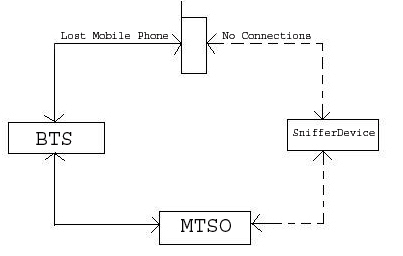
The sniffer is basically a transceiver that works in the frequency which is in the special unused range that is operated by the service provided or it can designed to operate at a frequency that is of much different frequency than the one that is being used by the nearby cells as there may be possibility of interference by the device with the devices in the nearby cells. The working for the device is as follows. The fig 2 &3 shows the working of the sniffer ; as given in the fig2 it gives the normal operation of the mobile with the base station and there is a BTS that acts as a middle man in the process of communication between the mobile and the MTSO which is popularly known as MSC or Mobile Switching Centre .There is always a two way communication between devices and before the establishment of the communication the authentication of the SIM card that has the IMSI or the International Mobile Subscriber Identifier .This IMSI number helps in the authorization of the user. The second authentication is the authentication of the handset, which is done in EIR or the Equipment Identifier Register. This register is located at the MSC and it contains the IMEI number of the lost handset and if the signal is obtained from the normal one then the two way communication is established.
The IMEI of the lost mobile phone number once has been reported to the service provider, who keeps in track of the record of lost mobile phones. The MTSO or the MSC which keeps in track of all the mobile phones with IMEI number and the IMSI number has the information of the lost mobile phones location which means the location of the cell where the lost device is because of the two way communication with the device the BTS of the lost device is known to MSC. From this information regarding the cell in which the device is located the sniffer device is introduced.Fig 3 . The connection of the sniffer device with the lost mobile phone.
Here the signal strength of the received signal is obtain antenna pattern is plotted once the signal of the mobile is obtained. The no. of antenna pattern for different position of same mobile phone is used to find the exact location. But however in this method the directional antenna used much be of a very small beam width this helps in more accurate process of detection. Fig4 the sniffer shown in fig tries to communicate with the lost mobile.
After getting connected with the mobile it creates a virtual cell pattern and thus helps in the detection of lost mobile phones.
5.CONCLUSION:
Since the boom of the mobile phone for the purpose of the communication there has been a large no. of complaints regarding the mobile phone that is being lost and there has been no effective method developed for detecting the lost device. The given paper dealt about the idea of development “Sniffer for the detection of lost Mobile phones” paves a way by means of which the lost mobile phones can be recovered. But the process of detection is yet to be developed through the software and demo has been developed and is with the authors. The demo has been written in VB that gives the over view of how the lost mobile is being detected and the software has been written in C. The SQL has to be used for the purpose of querying and the internal architecture is of lesser complexity compared to the base station as this mainly involves the control signal and there is no need for the voice process.
The design involved the following:
Design of the sniffer base station design of unidirectional l antenna, development of software for tracking. Though this method appears to be a little bit complex involving the design of the sniffer but however for large scale detection the overall effective cost of the design and the detection scales down.
There are certain boundary conditions or criteria that have to be qualified for the identification of the lost mobile like the power of the mobile should be good enough , the mobile phone should not be in the shadow region etc., but however this method can be improved by using modern technologies and devices.
APPENDIX
IMEI: International Mobile Equipment Identifier.
SNIFFER: The small transceiver used for detecting lost mobile phone.
IMSI: International Mobile Subscriber Identifier.
BTS: Base transceiver station.
MTSO: Mobile Telephone Switching Office.
MSC: Mobile Station Switching Controller.
Ok friends,its all about sniffer device which i want to discuss.I hope it was quite understandable.Please leave comments in favour if you like and you can give suggestion also if I did any mistake.............
I will post new artical soon.....keep on watching.........bye
Script to show use of for loop
echo Enter any sentence
read a
echo
echo Words in given sentence are:-
for i in $a
do
echo $i
done
~
~
~
~
~
~
~
~
~
~
~
~
~
~
~
"for" 8L, 94C
Output:-
Enter any sentence
Sky is not so high you can touch it if you try
Words in given sentence are:-
Sky
is
not
so
high
you
can
touch
it
if
you
try
read a
echo
echo Words in given sentence are:-
for i in $a
do
echo $i
done
~
~
~
~
~
~
~
~
~
~
~
~
~
~
~
"for" 8L, 94C
Output:-
Enter any sentence
Sky is not so high you can touch it if you try
Words in given sentence are:-
Sky
is
not
so
high
you
can
touch
it
if
you
try
Script to show use of if-else control structure
echo enter two numbers:-
read a
read b
echo
if [ $a -gt $b ]
then
echo a is greater
else
echo b is greater
fi
~
~
~
~
~
~
~
~
~
~
~
~
"if" 11L, 160C
Output:-
enter two numbers:-
12
11
a is greater
read a
read b
echo
if [ $a -gt $b ]
then
echo a is greater
else
echo b is greater
fi
~
~
~
~
~
~
~
~
~
~
~
~
"if" 11L, 160C
Output:-
enter two numbers:-
12
11
a is greater
Script to show the use of while loop.
echo Enter a number to print it's table
read n
i=1
while [ $i -lt 10 ]
do
i='expr$i*$n'
i='expr$i+1'
echo $i
done
~
~
~
~
~
~
~
~
~
~
"while" 13L, 158C
Output:-
Even numbers between 1-20 are:-
2
4
6
8
10
12
14
16
18
20
read n
i=1
while [ $i -lt 10 ]
do
i='expr$i*$n'
i='expr$i+1'
echo $i
done
~
~
~
~
~
~
~
~
~
~
"while" 13L, 158C
Output:-
Even numbers between 1-20 are:-
2
4
6
8
10
12
14
16
18
20
Script to sort the contents of file
echo Enter name of file
read a
echo
echo Contents of file are:-
cat $a
echo
echo After sorting, contents are:-
sort $a
echo
echo Enter two files for sorting
read a
read b
echo
echo After sorting of these files, contents are:-
sort $a $b
echo
echo Store sorted output in a new file name kannu
sort -okannu $a $b
echo
echo Showing contents of file kannu
cat kannu
~
~
~
~
~
~
Output:-
Enter name of file
Records
Contents of file are:-
Meenu |23 |40000 |7206297384
jyoti |20 |35000 |9813456782
mamta |21 |32000 |9017720166
kavita |22 |30000 |9014445623
neha |23 |34500 |8014465777
sanchi |24 |23000 |9014356278
nishtha |25 |24567 |7289786254
mohina |19 |45000 |9824568753
mohit |22 |43000 |7013442455
pooja |21 |34590 |9013324658
monika |34 |23000 |7823445678
neenu |33 |34000 |8076543210
meena |24 |32000 |9876543210
sonika |20 |43000 |8097634521
meenal |34 |31000 |8709653412
After sorting,contents are:-
jyoti |20 |35000 |9813456782
kavita |22 |30000 |9014445623
mamta |21 |32000 |9017720166
meena |24 |32000 |9876543210
meenal |34 |31000 |8709653412
Meenu |23 |40000 |7206297384
mohina |19 |45000 |9824568753
mohit |22 |43000 |7013442455
monika |34 |23000 |7823445678
neenu |33 |34000 |8076543210
neha |23 |34500 |8014465777
nishtha |25 |24567 |7289786254
pooja |21 |34590 |9013324658
sanchi |24 |23000 |9014356278
sonika |20 |43000 |8097634521
Enter two files for sorting
rain
menu
After sorting of these files,contens are:-
book
come to lab
cook
dook
kook
kool
look
Store sorted output in a new file name kannu
Showing contents of file kannu
book
come to lab
cook
dook
kook
kool
look
read a
echo
echo Contents of file are:-
cat $a
echo
echo After sorting, contents are:-
sort $a
echo
echo Enter two files for sorting
read a
read b
echo
echo After sorting of these files, contents are:-
sort $a $b
echo
echo Store sorted output in a new file name kannu
sort -okannu $a $b
echo
echo Showing contents of file kannu
cat kannu
~
~
~
~
~
~
Output:-
Enter name of file
Records
Contents of file are:-
Meenu |23 |40000 |7206297384
jyoti |20 |35000 |9813456782
mamta |21 |32000 |9017720166
kavita |22 |30000 |9014445623
neha |23 |34500 |8014465777
sanchi |24 |23000 |9014356278
nishtha |25 |24567 |7289786254
mohina |19 |45000 |9824568753
mohit |22 |43000 |7013442455
pooja |21 |34590 |9013324658
monika |34 |23000 |7823445678
neenu |33 |34000 |8076543210
meena |24 |32000 |9876543210
sonika |20 |43000 |8097634521
meenal |34 |31000 |8709653412
After sorting,contents are:-
jyoti |20 |35000 |9813456782
kavita |22 |30000 |9014445623
mamta |21 |32000 |9017720166
meena |24 |32000 |9876543210
meenal |34 |31000 |8709653412
Meenu |23 |40000 |7206297384
mohina |19 |45000 |9824568753
mohit |22 |43000 |7013442455
monika |34 |23000 |7823445678
neenu |33 |34000 |8076543210
neha |23 |34500 |8014465777
nishtha |25 |24567 |7289786254
pooja |21 |34590 |9013324658
sanchi |24 |23000 |9014356278
sonika |20 |43000 |8097634521
Enter two files for sorting
rain
menu
After sorting of these files,contens are:-
book
come to lab
cook
dook
kook
kool
look
Store sorted output in a new file name kannu
Showing contents of file kannu
book
come to lab
cook
dook
kook
kool
look
Script to show the case control structure
echo enter number
read a
echo
while [ $a -eq 1 ]
do
echo choices are:-
echo 1. To copy the files
echo 2. To show list of files
echo 3. To show use of head
echo *. Exit
echo
echo enter the choice
read ch
case $ch in
1) echo enter the source and target file
read a b
if cp $a $b
then
echo file copied successfully
fi
;;
echo
2) echo list of files with permission:-
ls -l
;;
echo
3) echo Enter the file
read k
echo Showing the 10 lines of files
head $k
;;
echo
*) exit ;;
esac
done
Output:-
enter number
1
choices are:-
1. To copy the files
2. To show list of files
3. To show use of head
*. Exit
enter the choice
2
list of files with permission:-
total 686
-rw-r--r-- 1 root root 0 Mar 20 14:51 ?[?1049l?
-rw-r--r-- 1 root root 0 Mar 20 14:51 ?[?12l?[?25h?[?1049l?]0
-rw-r--r-- 1 root root 55 Apr 6 15:44 2713
-rw-r--r-- 1 root root 0 Mar 21 15:13 2744
-rw-r--r-- 1 root root 0 Mar 21 15:06 2912
-rw-r--r-- 1 root root 0 Mar 21 15:07 2921
-rw-r--r-- 1 root root 0 Mar 21 15:10 2935
-rw-r--r-- 1 root root 52 Mar 30 15:15 3gt
-rw------- 1 root root 729 Feb 21 15:13 anaconda-ks.cfg
-rw-r--r-- 1 root root 23 Mar 21 14:24 anand1
-rw-r--r-- 1 root root 90 Apr 4 15:17 asd
-rw-r--r-- 1 root root 449 Apr 4 16:00 awk
-rw-r--r-- 1 root root 6 Feb 22 14:23 cmd
-rw-r--r-- 1 root root 0 Feb 27 15:06 cmdfile
-rw-r--r-- 1 root root 0 Feb 22 14:24 com
-rw-r--r-- 1 root root 469 Apr 6 15:31 database
drwxr-xr-x 3 root root 4096 Apr 10 16:25 Desktop
-rw-r--r-- 1 root root 69 Mar 16 14:45 emp.lst
-rw-r--r-- 1 root root 23 Mar 19 14:20 emp.txt
-rw-r--r-- 1 root root 18 Feb 22 14:14 end
-rw-r--r-- 1 root root 214 Mar 30 15:42 even
-rw-r--r-- 1 root root 30 Mar 1 14:49 govind
-rw-r--r-- 1 root root 557 Apr 10 15:56 grep
drwxr-xr-x 4 root root 4096 Mar 14 14:47 heena
-rw-r--r-- 1 root root 105 Mar 30 15:13 if
-rw-r--r-- 1 root root 29101 Feb 21 15:13 install.log
-rw-r--r-- 1 root root 0 Feb 21 14:57 install.log.syslog
-rw-r--r-- 1 root root 153 Feb 28 14:43 jyoti
-rw-r--r-- 1 root root 30 Mar 1 14:59 kanha
-rw-r--r-- 1 root root 164 Mar 1 14:21 kanhaiya
-rw-r--r-- 1 root root 0 Feb 28 14:21 keeru
-rw-r--r-- 1 root root 30 Mar 1 14:29 keshav
-rw-r--r-- 1 root root 30 Mar 1 14:48 madhav
-rw-r--r-- 1 root root 19 Mar 13 14:25 main
-rw-r--r-- 1 root root 30 Apr 11 15:29 meenu
-rw-r--r-- 1 root root 12 Mar 20 15:05 nav
-rw-r--r-- 1 root root 80 Feb 28 14:40 neelam
-rw-r--r-- 1 root root 34 Feb 22 14:13 pa
-rw-r--r-- 1 root root 27 Mar 13 14:25 pai
-rw-r--r-- 1 root root 34 Apr 3 15:15 radhe
-rw-r--r-- 1 root root 34 Apr 11 15:13 radhika
-rw-r--r-- 1 root root 12 Mar 13 14:26 rain
-rw-r--r-- 1 root root 20 Apr 5 15:08 result
-rw-r--r-- 1 root root 188416 Mar 21 15:13 wc.sh
-rw-r--r-- 1 root root 379 Apr 10 16:27 sed
-rwx-w---x 1 root root 69632 Mar 20 15:19 sorting.sh
-rw-r--r-- 1 root root 185 Mar 19 14:52 stu.lst
-rw-r--r-- 1 root root 57 Mar 16 15:16 stu.txt
-rw-r--r-- 1 root root 59 Mar 30 14:37 sum
-rw-r--r-- 1 root root 540 Apr 11 15:26 switch
-rw-r--r-- 1 root root 216 Mar 21 14:37 wc
choices are:-
1. To copy the files
2. To show list of files
3. To show use of head
*. Exit
enter the choice
3
Enter the file
Database
Showing the 10 lines of files
Name |Age |salary |contact no.
Meenu |23 |40000 |7206297384
jyoti |20 |35000 |9813456782
mamta |21 |32000 |9017720166
kavita |22 |30000 |9014445623
neha |23 |34500 |8014465777
sanchi |24 |23000 |9014356278
nishtha |25 |24567 |7289786254
mohina |19 |45000 |9824568753
mohit |22 |43000 |7013442455
choices are:-
1. To copy the files
2. To show list of files
3. To show use of head
*. Exit
enter the choice
7
[root@localhost ~]#
read a
echo
while [ $a -eq 1 ]
do
echo choices are:-
echo 1. To copy the files
echo 2. To show list of files
echo 3. To show use of head
echo *. Exit
echo
echo enter the choice
read ch
case $ch in
1) echo enter the source and target file
read a b
if cp $a $b
then
echo file copied successfully
fi
;;
echo
2) echo list of files with permission:-
ls -l
;;
echo
3) echo Enter the file
read k
echo Showing the 10 lines of files
head $k
;;
echo
*) exit ;;
esac
done
Output:-
enter number
1
choices are:-
1. To copy the files
2. To show list of files
3. To show use of head
*. Exit
enter the choice
2
list of files with permission:-
total 686
-rw-r--r-- 1 root root 0 Mar 20 14:51 ?[?1049l?
-rw-r--r-- 1 root root 0 Mar 20 14:51 ?[?12l?[?25h?[?1049l?]0
-rw-r--r-- 1 root root 55 Apr 6 15:44 2713
-rw-r--r-- 1 root root 0 Mar 21 15:13 2744
-rw-r--r-- 1 root root 0 Mar 21 15:06 2912
-rw-r--r-- 1 root root 0 Mar 21 15:07 2921
-rw-r--r-- 1 root root 0 Mar 21 15:10 2935
-rw-r--r-- 1 root root 52 Mar 30 15:15 3gt
-rw------- 1 root root 729 Feb 21 15:13 anaconda-ks.cfg
-rw-r--r-- 1 root root 23 Mar 21 14:24 anand1
-rw-r--r-- 1 root root 90 Apr 4 15:17 asd
-rw-r--r-- 1 root root 449 Apr 4 16:00 awk
-rw-r--r-- 1 root root 6 Feb 22 14:23 cmd
-rw-r--r-- 1 root root 0 Feb 27 15:06 cmdfile
-rw-r--r-- 1 root root 0 Feb 22 14:24 com
-rw-r--r-- 1 root root 469 Apr 6 15:31 database
drwxr-xr-x 3 root root 4096 Apr 10 16:25 Desktop
-rw-r--r-- 1 root root 69 Mar 16 14:45 emp.lst
-rw-r--r-- 1 root root 23 Mar 19 14:20 emp.txt
-rw-r--r-- 1 root root 18 Feb 22 14:14 end
-rw-r--r-- 1 root root 214 Mar 30 15:42 even
-rw-r--r-- 1 root root 30 Mar 1 14:49 govind
-rw-r--r-- 1 root root 557 Apr 10 15:56 grep
drwxr-xr-x 4 root root 4096 Mar 14 14:47 heena
-rw-r--r-- 1 root root 105 Mar 30 15:13 if
-rw-r--r-- 1 root root 29101 Feb 21 15:13 install.log
-rw-r--r-- 1 root root 0 Feb 21 14:57 install.log.syslog
-rw-r--r-- 1 root root 153 Feb 28 14:43 jyoti
-rw-r--r-- 1 root root 30 Mar 1 14:59 kanha
-rw-r--r-- 1 root root 164 Mar 1 14:21 kanhaiya
-rw-r--r-- 1 root root 0 Feb 28 14:21 keeru
-rw-r--r-- 1 root root 30 Mar 1 14:29 keshav
-rw-r--r-- 1 root root 30 Mar 1 14:48 madhav
-rw-r--r-- 1 root root 19 Mar 13 14:25 main
-rw-r--r-- 1 root root 30 Apr 11 15:29 meenu
-rw-r--r-- 1 root root 12 Mar 20 15:05 nav
-rw-r--r-- 1 root root 80 Feb 28 14:40 neelam
-rw-r--r-- 1 root root 34 Feb 22 14:13 pa
-rw-r--r-- 1 root root 27 Mar 13 14:25 pai
-rw-r--r-- 1 root root 34 Apr 3 15:15 radhe
-rw-r--r-- 1 root root 34 Apr 11 15:13 radhika
-rw-r--r-- 1 root root 12 Mar 13 14:26 rain
-rw-r--r-- 1 root root 20 Apr 5 15:08 result
-rw-r--r-- 1 root root 188416 Mar 21 15:13 wc.sh
-rw-r--r-- 1 root root 379 Apr 10 16:27 sed
-rwx-w---x 1 root root 69632 Mar 20 15:19 sorting.sh
-rw-r--r-- 1 root root 185 Mar 19 14:52 stu.lst
-rw-r--r-- 1 root root 57 Mar 16 15:16 stu.txt
-rw-r--r-- 1 root root 59 Mar 30 14:37 sum
-rw-r--r-- 1 root root 540 Apr 11 15:26 switch
-rw-r--r-- 1 root root 216 Mar 21 14:37 wc
choices are:-
1. To copy the files
2. To show list of files
3. To show use of head
*. Exit
enter the choice
3
Enter the file
Database
Showing the 10 lines of files
Name |Age |salary |contact no.
Meenu |23 |40000 |7206297384
jyoti |20 |35000 |9813456782
mamta |21 |32000 |9017720166
kavita |22 |30000 |9014445623
neha |23 |34500 |8014465777
sanchi |24 |23000 |9014356278
nishtha |25 |24567 |7289786254
mohina |19 |45000 |9824568753
mohit |22 |43000 |7013442455
choices are:-
1. To copy the files
2. To show list of files
3. To show use of head
*. Exit
enter the choice
7
[root@localhost ~]#
Script for making use of multiple options of sed command.
echo Enter the given database
read a1
echo
echo Database is
cat $a1
echo
echo Show first three lines of database:
sed '3q' $a1
echo
echo show database within a range 2-4:-
sed -n '2,4p' $a1
echo
echo Show database within range 3-7 and last line
sed -n -e '3,7p' -e '$p' $a1
echo
echo Show lines having pattern Meenu
sed -n '/[Mn]eenu/p' $a1
Output:-
Enter the given database
Database
Database is
|Name |Age |salary |contact no.
|Meenu |23 |40000 |7206297384
|jyoti |20 |35000 |9813456782
|mamta |21 |32000 |9017720166
|kavita |22 |30000 |9014445623
|neha |23 |34500 |8014465777
|sanchi |24 |23000 |9014356278
|nishtha |25 |24567 |7289786254
|mohina |19 |45000 |9824568753
|mohit |22 |43000 |7013442455
|pooja |21 |34590 |9013324658
|monika |34 |23000 |7823445678
|neenu |33 |34000 |8076543210
Show first three lines of database:
|Name |Age |salary |contact no.
|Meenu |23 |40000 |7206297384
|jyoti |20 |35000 |9813456782
show database within a range 2-4:-
|Meenu |23 |40000 |7206297384
|jyoti |20 |35000 |9813456782
|mamta |21 |32000 |9017720166
Show database within range 3-7 and last line
|jyoti |20 |35000 |9813456782
|mamta |21 |32000 |9017720166
|kavita |22 |30000 |9014445623
|neha |23 |34500 |8014465777
|sanchi |24 |23000 |9014356278
|neenu |33 |34000 |8076543210
|Show lines having pattern Meenu
|Meenu |23 |40000 |7206297384
|neenu |33 |34000 |8076543210
read a1
echo
echo Database is
cat $a1
echo
echo Show first three lines of database:
sed '3q' $a1
echo
echo show database within a range 2-4:-
sed -n '2,4p' $a1
echo
echo Show database within range 3-7 and last line
sed -n -e '3,7p' -e '$p' $a1
echo
echo Show lines having pattern Meenu
sed -n '/[Mn]eenu/p' $a1
Output:-
Enter the given database
Database
Database is
|Name |Age |salary |contact no.
|Meenu |23 |40000 |7206297384
|jyoti |20 |35000 |9813456782
|mamta |21 |32000 |9017720166
|kavita |22 |30000 |9014445623
|neha |23 |34500 |8014465777
|sanchi |24 |23000 |9014356278
|nishtha |25 |24567 |7289786254
|mohina |19 |45000 |9824568753
|mohit |22 |43000 |7013442455
|pooja |21 |34590 |9013324658
|monika |34 |23000 |7823445678
|neenu |33 |34000 |8076543210
Show first three lines of database:
|Name |Age |salary |contact no.
|Meenu |23 |40000 |7206297384
|jyoti |20 |35000 |9813456782
show database within a range 2-4:-
|Meenu |23 |40000 |7206297384
|jyoti |20 |35000 |9813456782
|mamta |21 |32000 |9017720166
Show database within range 3-7 and last line
|jyoti |20 |35000 |9813456782
|mamta |21 |32000 |9017720166
|kavita |22 |30000 |9014445623
|neha |23 |34500 |8014465777
|sanchi |24 |23000 |9014356278
|neenu |33 |34000 |8076543210
|Show lines having pattern Meenu
|Meenu |23 |40000 |7206297384
|neenu |33 |34000 |8076543210
Scipt showing use of perl command
echo print '@' symbol 10 times:-
perl -e 'print "@\n" x 10;'
echo
echo concatenate two words:-
perl -e '$x="meenakshi "; $y="sharma"; print( $x.$y."\n");'
echo
echo Show first three lines of file database
perl -ne 'print if($.<4)' database
Output:-
print @ symbol 10 times:-
@
@
@
@
@
@
@
@
@
@
concatenate two words:-
meenakshi sharma
Show first three lines of file database
Name |Age |salary |contact no.
Meenu |23 |40000 |7206297384
jyoti |20 |35000 |9813456782
perl -e 'print "@\n" x 10;'
echo
echo concatenate two words:-
perl -e '$x="meenakshi "; $y="sharma"; print( $x.$y."\n");'
echo
echo Show first three lines of file database
perl -ne 'print if($.<4)' database
Output:-
print @ symbol 10 times:-
@
@
@
@
@
@
@
@
@
@
concatenate two words:-
meenakshi sharma
Show first three lines of file database
Name |Age |salary |contact no.
Meenu |23 |40000 |7206297384
jyoti |20 |35000 |9813456782
Script to show use of if control structure
echo Enter two files
read a b
echo
echo contents of first file:-
cat $a
echo
echo contents of second file:-
cat $b
if(($a==$b))
then
echo contents are same
fi
~
~
~
~
~
~
~
~
~
~
"oif" 13L, 197C
Output:-
Enter two files
pa radhe
contents of first file:-
jiska koi nhi uska khuda hai yaro
contents of second file:-
jiska koi nhi uska khuda hai yaro
contents are same
read a b
echo
echo contents of first file:-
cat $a
echo
echo contents of second file:-
cat $b
if(($a==$b))
then
echo contents are same
fi
~
~
~
~
~
~
~
~
~
~
"oif" 13L, 197C
Output:-
Enter two files
pa radhe
contents of first file:-
jiska koi nhi uska khuda hai yaro
contents of second file:-
jiska koi nhi uska khuda hai yaro
contents are same
Script showing the use of head,tail and more command
echo Enter file name
read a
echo
echo Contents of file are:-
cat $a
echo
echo Showing first 12 lines from given file
head -12 $a
echo
echo Showing last 15 lines from given file
tail -15 $a
echo
echo Showing contents within the range 10-15
more +10 -5 -d $a
~
~
~
"head" 11L, 263C
Output:-
Enter file name
Jannat
Contents of file are:-
Tit for tat.
Do good have good
radhe radhe
Saini sir test le rhe h\
Never forget god and your aim.
Sab ka malik ek h
jindgi ek safar h suhana.
jeena kya jeevan se har ke.
chhodo kal ki baten kal ki bat purani aaj hm likhenge unix ki nyi kahani.
go to hell.
Jai shree krishna.
tyari kr lo bacho exam postpone nhi huye.
syllabus bhut jyada h.
lets do one night fight.
khalo kha lo hmare bhi din aayenge.
Necessity is mother of invention.
Prevention is better than cure.
jai mata di.
life is a race.
slow and steady wins the race.
rain is coming.
jitin party de rha h .
Aman mam chle gye.
Showing first 12 lines from given file
Tit for tat.
Do good have good
radhe radhe
Saini sir test le rhe h\
Never forget god and your aim.
Sab ka malik ek h
jindgi ek safar h suhana.
jeena kya jeevan se har ke.
chhodo kal ki baten kal ki bat purani aaj hm likhenge unix ki nyi kahani.
go to hell.
Jai shree krishna.
tyari kr lo bacho exam postpone nhi huye.
Showing last 15 lines from given file
chhodo kal ki baten kal ki bat purani aaj hm likhenge unix ki nyi kahani.
go to hell.
Jai shree krishna.
tyari kr lo bacho exam postpone nhi huye.
syllabus bhut jyada h.
lets do one night fight.
khalo kha lo hmare bhi din aayenge.
Necessity is mother of invention.
Prevention is better than cure.
jai mata di.
life is a race.
slow and steady wins the race.
rain is coming.
jitin party de rha h .
Aman mam chle gye.
Showing contents within the range 10-15
go to hell.
Jai shree krishna.
tyari kr lo bacho exam postpone nhi huye.
syllabus bhut jyada h.
lets do one night fight.
--More--(62%)[Press space to continue,'q' to quit.]
read a
echo
echo Contents of file are:-
cat $a
echo
echo Showing first 12 lines from given file
head -12 $a
echo
echo Showing last 15 lines from given file
tail -15 $a
echo
echo Showing contents within the range 10-15
more +10 -5 -d $a
~
~
~
"head" 11L, 263C
Output:-
Enter file name
Jannat
Contents of file are:-
Tit for tat.
Do good have good
radhe radhe
Saini sir test le rhe h\
Never forget god and your aim.
Sab ka malik ek h
jindgi ek safar h suhana.
jeena kya jeevan se har ke.
chhodo kal ki baten kal ki bat purani aaj hm likhenge unix ki nyi kahani.
go to hell.
Jai shree krishna.
tyari kr lo bacho exam postpone nhi huye.
syllabus bhut jyada h.
lets do one night fight.
khalo kha lo hmare bhi din aayenge.
Necessity is mother of invention.
Prevention is better than cure.
jai mata di.
life is a race.
slow and steady wins the race.
rain is coming.
jitin party de rha h .
Aman mam chle gye.
Showing first 12 lines from given file
Tit for tat.
Do good have good
radhe radhe
Saini sir test le rhe h\
Never forget god and your aim.
Sab ka malik ek h
jindgi ek safar h suhana.
jeena kya jeevan se har ke.
chhodo kal ki baten kal ki bat purani aaj hm likhenge unix ki nyi kahani.
go to hell.
Jai shree krishna.
tyari kr lo bacho exam postpone nhi huye.
Showing last 15 lines from given file
chhodo kal ki baten kal ki bat purani aaj hm likhenge unix ki nyi kahani.
go to hell.
Jai shree krishna.
tyari kr lo bacho exam postpone nhi huye.
syllabus bhut jyada h.
lets do one night fight.
khalo kha lo hmare bhi din aayenge.
Necessity is mother of invention.
Prevention is better than cure.
jai mata di.
life is a race.
slow and steady wins the race.
rain is coming.
jitin party de rha h .
Aman mam chle gye.
Showing contents within the range 10-15
go to hell.
Jai shree krishna.
tyari kr lo bacho exam postpone nhi huye.
syllabus bhut jyada h.
lets do one night fight.
--More--(62%)[Press space to continue,'q' to quit.]
Script for calculating characters,words and lines in a fil
echo "Enter the file name"
read a
echo
echo Contents of file are:-
cat $a
echo
echo "Number of lines in given file"
wc -l $a
echo
echo "Number of words in given file"
wc -w $a
echo
echo "Number of characters in given file"
wc -c $a
~
~
~
~
~
~
~
~
~
~
~
"wc" 12L, 275C
Output:-
Enter the file name
pa
Contents of file are:-
jiska koi nhi uska khuda hai yaro
Number of lines in given file
1 pa
Number of words in given file
7 pa
Number of characters in given file
34 pa
read a
echo
echo Contents of file are:-
cat $a
echo
echo "Number of lines in given file"
wc -l $a
echo
echo "Number of words in given file"
wc -w $a
echo
echo "Number of characters in given file"
wc -c $a
~
~
~
~
~
~
~
~
~
~
~
"wc" 12L, 275C
Output:-
Enter the file name
pa
Contents of file are:-
jiska koi nhi uska khuda hai yaro
Number of lines in given file
1 pa
Number of words in given file
7 pa
Number of characters in given file
34 pa
Script to show the multiple option of awk command
echo enter the database
read a
echo
echo Contents of file are:-
cat $a
echo
echo show 1,2,3 column of given pattern :-
awk -F"|" '/[Mn]eenu/ { print $1, $2, $3 }' $a
echo
echo show data within range 3-6
awk -F"|" 'NR == 3, NR == 6 { print }' $a
echo
echo show record of jyoti in formatted way
awk -F"|" '/jyoti/ {
printf "%-7s %5d %-10d %12d\n",$1,$2,$3,$4 }' $a
echo
echo save record of jyoti in a file name result
awk -F"|" '/jyoti/ {
printf "%-7s %12d",$1,$4 }' $a > "result"
echo result file is:-
cat result
~
~
~
~
~
~
"awk" 17L, 506C
Output:-
enter the database
database
Contents of file are:-
Name |Age |salary |contact no.
Meenu |23 |40000 |7206297384
jyoti |20 |35000 |9813456782
mamta |21 |32000 |9017720166
kavita |22 |30000 |9014445623
neha |23 |34500 |8014465777
sanchi |24 |23000 |9014356278
nishtha |25 |24567 |7289786254
mohina |19 |45000 |9824568753
mohit |22 |43000 |7013442455
pooja |21 |34590 |9013324658
monika |34 |23000 |7823445678
neenu |33 |34000 |8076543210
Show 1,2,3 column of given pattern :-
Meenu 23 40000
neenu 33 34000
show data within range 3-6
jyoti |20 |35000 |9813456782
mamta |21 |32000 |9017720166
kavita |22 |30000 |9014445623
neha |23 |34500 |8014465777
show record of jyoti in formatted way
jyoti 20 35000 9813456782
save record of jyoti in a file name result
result file is:-
jyoti 9813456782
read a
echo
echo Contents of file are:-
cat $a
echo
echo show 1,2,3 column of given pattern :-
awk -F"|" '/[Mn]eenu/ { print $1, $2, $3 }' $a
echo
echo show data within range 3-6
awk -F"|" 'NR == 3, NR == 6 { print }' $a
echo
echo show record of jyoti in formatted way
awk -F"|" '/jyoti/ {
printf "%-7s %5d %-10d %12d\n",$1,$2,$3,$4 }' $a
echo
echo save record of jyoti in a file name result
awk -F"|" '/jyoti/ {
printf "%-7s %12d",$1,$4 }' $a > "result"
echo result file is:-
cat result
~
~
~
~
~
~
"awk" 17L, 506C
Output:-
enter the database
database
Contents of file are:-
Name |Age |salary |contact no.
Meenu |23 |40000 |7206297384
jyoti |20 |35000 |9813456782
mamta |21 |32000 |9017720166
kavita |22 |30000 |9014445623
neha |23 |34500 |8014465777
sanchi |24 |23000 |9014356278
nishtha |25 |24567 |7289786254
mohina |19 |45000 |9824568753
mohit |22 |43000 |7013442455
pooja |21 |34590 |9013324658
monika |34 |23000 |7823445678
neenu |33 |34000 |8076543210
Show 1,2,3 column of given pattern :-
Meenu 23 40000
neenu 33 34000
show data within range 3-6
jyoti |20 |35000 |9813456782
mamta |21 |32000 |9017720166
kavita |22 |30000 |9014445623
neha |23 |34500 |8014465777
show record of jyoti in formatted way
jyoti 20 35000 9813456782
save record of jyoti in a file name result
result file is:-
jyoti 9813456782
Script for making use of multiple options of grep command
vi grep and press enter
.
echo "Enter the database"
read a
echo
echo database is:-
cat $a
echo
echo "Search given patterns from database"
echo enter the salary
read s1
grep $s1 $a
echo
echo search those pattern in which age 22:-
grep -n 22 $a
echo
echo Do not display those pattern having age 22:-
grep -v 22 $a
echo
echo Searching multiple pattern of salary 23000 and name start with m:-
grep -e m -e 23000 $a
echo
echo Showing the use of character class:-
grep "[Mn]eenu" $a
echo
echo show the use of ^ to specify the pattern location
grep "^n" $a
~
~
Output:-
sh grep and press enter
Enter the database
Database
database is:-
|Name |Age |salary |contact no.
|Meenu |23 |40000 |7206297384
|jyoti |20 |35000 |9813456782
|mamta |21 |32000 |9017720166
|kavita |22 |30000 |9014445623
|neha |23 |34500 |8014465777
|sanchi |24 |23000 |9014356278
|nishtha |25 |24567 |7289786254
|mohina |19 |45000 |9824568753
|mohit |22 |43000 |7013442455
|pooja |21 |34590 |9013324658
|monika |34 |23000 |7823445678
|neenu |33 |34000 |8076543210
Search given patterns from database
enter the salary
3000
|sanchi |24 |23000 |9014356278
|monika |34 |23000 |7823445678
search those pattern in which age 22:-
5: |kavita |22 |30000 |9014445623
10:|mohit |22 |43000 |7013442455
Do not display those pattern having age 22:-
|Name |Age |salary |contact no.
|Meenu |23 |40000 |7206297384
|jyoti |20 |35000 |9813456782
|mamta |21 |32000 |9017720166
|neha |23 |34500 |8014465777
|sanchi |24 |23000 |9014356278
|nishtha |25 |24567 |7289786254
|mohina |19 |45000 |9824568753
|pooja |21 |34590 |9013324658
|monika |34 |23000 |7823445678
|neenu |33 |34000 |8076543210
Searching multiple pattern of salary 23000 and name start with m:-
|Name |Age |salary |contact no.
|mamta |21 |32000 |9017720166
|sanchi |24 |23000 |9014356278
|mohina |19 |45000 |9824568753
|mohit |22 |43000 |7013442455
|monika |34 |23000 |7823445678
Showing the use of character class:-
|Meenu |23 |40000 |7206297384
|neenu |33 |34000 |8076543210
show the use of ^ to specify the pattern location
|neha |23 |34500 |8014465777
|nishtha |25 |24567 |7289786254
|neenu |33 |34000 |8076543210
.
echo "Enter the database"
read a
echo
echo database is:-
cat $a
echo
echo "Search given patterns from database"
echo enter the salary
read s1
grep $s1 $a
echo
echo search those pattern in which age 22:-
grep -n 22 $a
echo
echo Do not display those pattern having age 22:-
grep -v 22 $a
echo
echo Searching multiple pattern of salary 23000 and name start with m:-
grep -e m -e 23000 $a
echo
echo Showing the use of character class:-
grep "[Mn]eenu" $a
echo
echo show the use of ^ to specify the pattern location
grep "^n" $a
~
~
Output:-
sh grep and press enter
Enter the database
Database
database is:-
|Name |Age |salary |contact no.
|Meenu |23 |40000 |7206297384
|jyoti |20 |35000 |9813456782
|mamta |21 |32000 |9017720166
|kavita |22 |30000 |9014445623
|neha |23 |34500 |8014465777
|sanchi |24 |23000 |9014356278
|nishtha |25 |24567 |7289786254
|mohina |19 |45000 |9824568753
|mohit |22 |43000 |7013442455
|pooja |21 |34590 |9013324658
|monika |34 |23000 |7823445678
|neenu |33 |34000 |8076543210
Search given patterns from database
enter the salary
3000
|sanchi |24 |23000 |9014356278
|monika |34 |23000 |7823445678
search those pattern in which age 22:-
5: |kavita |22 |30000 |9014445623
10:|mohit |22 |43000 |7013442455
Do not display those pattern having age 22:-
|Name |Age |salary |contact no.
|Meenu |23 |40000 |7206297384
|jyoti |20 |35000 |9813456782
|mamta |21 |32000 |9017720166
|neha |23 |34500 |8014465777
|sanchi |24 |23000 |9014356278
|nishtha |25 |24567 |7289786254
|mohina |19 |45000 |9824568753
|pooja |21 |34590 |9013324658
|monika |34 |23000 |7823445678
|neenu |33 |34000 |8076543210
Searching multiple pattern of salary 23000 and name start with m:-
|Name |Age |salary |contact no.
|mamta |21 |32000 |9017720166
|sanchi |24 |23000 |9014356278
|mohina |19 |45000 |9824568753
|mohit |22 |43000 |7013442455
|monika |34 |23000 |7823445678
Showing the use of character class:-
|Meenu |23 |40000 |7206297384
|neenu |33 |34000 |8076543210
show the use of ^ to specify the pattern location
|neha |23 |34500 |8014465777
|nishtha |25 |24567 |7289786254
|neenu |33 |34000 |8076543210
Script for showing all the basic commands of linux
echo show calendar of april month of year 2012
cal 4 2012
echo
echo show date and time
date
echo
echo creating a new file having name mca
cat > mca
echo
echo showing the contents of file mca
cat mca
echo
echo showing present working directory
pwd
echo
echo Creating a new directory
mkdir Nitika
echo
echo Showing the list of all directories
ls –ld
echo
echo show list of files
ls
echo
echo Enter the file which you want to remove
read a
rm -i $a
echo
echo Enter the name of user you want to add
read a
rm -i $a
echo
echo Enter the name of user you want to add
read a
adduser $a
passwd $a
echo
echo Showing the free disk space
df
echo
echo Showing list of all user
who
echo
echo showing list of file start with character k
ls k*
echo
echo showing permissions of file meenu
ls -l menu
echo
echo creating a hidden file name krishna
cat > .krishna
echo
echo Showing list of all hidden files
ls –a
Output:-
show calendar of april month of year 2012
April 2012
Su Mo Tu We Th Fr Sa
1 2 3 4 5 6 7
8 9 10 11 12 13 14
15 16 17 18 19 20 21
22 23 24 25 26 27 28
29 30
show date and time
Thu Apr 12 15:37:59 IST 2012
creating a new file having name mca
jai shree Krishna
showing the contents of file mca
jai shree Krishna
showing present working directory
/root
Creating a new directory
Showing the list of all directories
drwxr-x--- 20 root root 4096 Apr 12 15:38 .
show list of files
?[?1049l? com install.log neelam sed
?[?12l?[?25h?[?1049l?]0 database install.log.syslog Nishtha seema
2713 Desktop jyoti Nitika sorting.sh
2744 emp.lst kanha oif stu.lst
2912 emp.txt kanhaiya pa stu.txt
2921 end keshav pain sum
2935 even m prm switch
3gt f madhav qwe w
anaconda-ks.cfg for main radhe wc
anand1 for1 marks radhika while
asd govind mca rain
awk grep meenu rajji
cmd heena nav result
cmdfile if nav.txt script
Enter the file which you want to remove
mca
rm: remove regular file `mca'? y
Enter the name of user you want to add
keerti
Changing password for user keerti.
New UNIX password:
BAD PASSWORD: it is based on a dictionary word
Retype new UNIX password:
passwd: all authentication tokens updated successfully.
Showing the free disk space
Filesystem 1K-blocks Used Available Use% Mounted on
/dev/hda8 9920592 1913620 7494904 21% /
/dev/hda7 101054 10005 85832 11% /boot
/dev/hda10 26680708 176200 25127340 1% /cdlu
tmpfs 971620 0 971620 0% /dev/shm
Showing list of all user
root pts/0 2012-04-12 14:33 (:0.0)
showing list of file start with character k
kanha kanhaiya keshav
showing permissions of file meenu
-rwxr-xr-x 1 root root 30 Apr 11 15:29 meenu
creating a hidden file name krishna
gunjan ghar aa ja
Showing list of all hidden files
. for1 nav
.. .gconf nav.txt
?[?1049l? .gconfd neelam
?[?12l?[?25h?[?1049l?]0 .gnome Nishtha
2713 .gnome2 Nitika
2744 .gnome2_private oif
2912 govind pa
2921 grep pain
2935 .grep.swo prm
3gt .grep.swp qwe
anaconda-ks.cfg .gstreamer-0.10 radhe
anand1 .gtk-bookmarks radhika
asd .gtkrc-1.2-gnome2 rain
awk heena rajji
.bash_history .heena .recently-used.xbel
.bash_logout .heena.swp .redhat
.bash_profile .ICEauthority result
.bashrc if script
cmd install.log sed
cmdfile install.log.syslog .sed.swp
com jyoti seema
.config kanha sorting.sh
.cshrc kanhaiya stu.lst
database .keerti stu.txt
Desktop keshav sum
.dmrc .krishna switch
.eggcups m .switch.swp
emp.lst madhav .tcshrc
emp.txt main .thumbnails
end marks .Trash
.esd_auth meenu w
even .metacity wc
f .mozilla while
for .nautilus .xsession-errors
cal 4 2012
echo
echo show date and time
date
echo
echo creating a new file having name mca
cat > mca
echo
echo showing the contents of file mca
cat mca
echo
echo showing present working directory
pwd
echo
echo Creating a new directory
mkdir Nitika
echo
echo Showing the list of all directories
ls –ld
echo
echo show list of files
ls
echo
echo Enter the file which you want to remove
read a
rm -i $a
echo
echo Enter the name of user you want to add
read a
rm -i $a
echo
echo Enter the name of user you want to add
read a
adduser $a
passwd $a
echo
echo Showing the free disk space
df
echo
echo Showing list of all user
who
echo
echo showing list of file start with character k
ls k*
echo
echo showing permissions of file meenu
ls -l menu
echo
echo creating a hidden file name krishna
cat > .krishna
echo
echo Showing list of all hidden files
ls –a
Output:-
show calendar of april month of year 2012
April 2012
Su Mo Tu We Th Fr Sa
1 2 3 4 5 6 7
8 9 10 11 12 13 14
15 16 17 18 19 20 21
22 23 24 25 26 27 28
29 30
show date and time
Thu Apr 12 15:37:59 IST 2012
creating a new file having name mca
jai shree Krishna
showing the contents of file mca
jai shree Krishna
showing present working directory
/root
Creating a new directory
Showing the list of all directories
drwxr-x--- 20 root root 4096 Apr 12 15:38 .
show list of files
?[?1049l? com install.log neelam sed
?[?12l?[?25h?[?1049l?]0 database install.log.syslog Nishtha seema
2713 Desktop jyoti Nitika sorting.sh
2744 emp.lst kanha oif stu.lst
2912 emp.txt kanhaiya pa stu.txt
2921 end keshav pain sum
2935 even m prm switch
3gt f madhav qwe w
anaconda-ks.cfg for main radhe wc
anand1 for1 marks radhika while
asd govind mca rain
awk grep meenu rajji
cmd heena nav result
cmdfile if nav.txt script
Enter the file which you want to remove
mca
rm: remove regular file `mca'? y
Enter the name of user you want to add
keerti
Changing password for user keerti.
New UNIX password:
BAD PASSWORD: it is based on a dictionary word
Retype new UNIX password:
passwd: all authentication tokens updated successfully.
Showing the free disk space
Filesystem 1K-blocks Used Available Use% Mounted on
/dev/hda8 9920592 1913620 7494904 21% /
/dev/hda7 101054 10005 85832 11% /boot
/dev/hda10 26680708 176200 25127340 1% /cdlu
tmpfs 971620 0 971620 0% /dev/shm
Showing list of all user
root pts/0 2012-04-12 14:33 (:0.0)
showing list of file start with character k
kanha kanhaiya keshav
showing permissions of file meenu
-rwxr-xr-x 1 root root 30 Apr 11 15:29 meenu
creating a hidden file name krishna
gunjan ghar aa ja
Showing list of all hidden files
. for1 nav
.. .gconf nav.txt
?[?1049l? .gconfd neelam
?[?12l?[?25h?[?1049l?]0 .gnome Nishtha
2713 .gnome2 Nitika
2744 .gnome2_private oif
2912 govind pa
2921 grep pain
2935 .grep.swo prm
3gt .grep.swp qwe
anaconda-ks.cfg .gstreamer-0.10 radhe
anand1 .gtk-bookmarks radhika
asd .gtkrc-1.2-gnome2 rain
awk heena rajji
.bash_history .heena .recently-used.xbel
.bash_logout .heena.swp .redhat
.bash_profile .ICEauthority result
.bashrc if script
cmd install.log sed
cmdfile install.log.syslog .sed.swp
com jyoti seema
.config kanha sorting.sh
.cshrc kanhaiya stu.lst
database .keerti stu.txt
Desktop keshav sum
.dmrc .krishna switch
.eggcups m .switch.swp
emp.lst madhav .tcshrc
emp.txt main .thumbnails
end marks .Trash
.esd_auth meenu w
even .metacity wc
f .mozilla while
for .nautilus .xsession-errors
How to write script in Vi Editor
Hello Friends,
In previous article i discussed a brief introduction of Unix/Linux operating system.In this article i will show you how to write a script in vi editor.
Firstly we should know what is editor? Editor is for editing in a files.When we create a file in unix then through editor we can modify file.Mainly 3 editors used in Unix.
1. Ed editor
2. Ex editor
3. Vi Editor
Ed editor used in previous time on command line.It works on line number.Then after it ex editor comes into picture.Now a days Vi editor is used for writing script.it was first editor to display file on whole screen.
In unix file can be created through a command:-
cat > filename
contents of file................
................
ctrl+d
Now if we want to edit content of file created by Unix/Linux ,we can use vi editor.
How to use vi editor:-
In Vi editor there is three modes:
1. command mode
2. Insert mode
3. Ex command mode
We can write script in insert mode.For editing through Vi editor :-
1. Firstly vi filename and press enter key.
2.Now select position at which you want to modify through commands h,j,k,l.
3. Press i for insert mode and carry out modification.
4. save changes through command by firstly press Esc for command mode and then Shift+z or ZZ.
if You write a script then you can execute that script by writing on command prompt:-
sh filename and press enter
Ok friends ,i hope you get something from this.i will Explain you how to write script through example in next article.Stay in touch..................
Thank you.
In previous article i discussed a brief introduction of Unix/Linux operating system.In this article i will show you how to write a script in vi editor.
Firstly we should know what is editor? Editor is for editing in a files.When we create a file in unix then through editor we can modify file.Mainly 3 editors used in Unix.
1. Ed editor
2. Ex editor
3. Vi Editor
Ed editor used in previous time on command line.It works on line number.Then after it ex editor comes into picture.Now a days Vi editor is used for writing script.it was first editor to display file on whole screen.
In unix file can be created through a command:-
cat > filename
contents of file................
................
ctrl+d
Now if we want to edit content of file created by Unix/Linux ,we can use vi editor.
How to use vi editor:-
In Vi editor there is three modes:
1. command mode
2. Insert mode
3. Ex command mode
We can write script in insert mode.For editing through Vi editor :-
1. Firstly vi filename and press enter key.
2.Now select position at which you want to modify through commands h,j,k,l.
3. Press i for insert mode and carry out modification.
4. save changes through command by firstly press Esc for command mode and then Shift+z or ZZ.
if You write a script then you can execute that script by writing on command prompt:-
sh filename and press enter
Ok friends ,i hope you get something from this.i will Explain you how to write script through example in next article.Stay in touch..................
Thank you.
Introduction to unix/Linux
Hello friends,
The origin of Unix trace in 1965 by Bell telephone laboratory,the General Electronic Company & Massachusetts institute of Technology.
Aim of that association was to develop an operating system that could serve a large community of users and allow them to share data if neeeded.
Danis Ritchie and Ken Thomson in 1969 create a first version of multiuser system Unix on computer PDP-7.
In 1971 Unix ported to PDP-11 with 512 KB disk.Then unix is a 16 KB system with 8kb for user program and upper limit of 64 KB per file,Unix was machine dependent.Ken create B language and rewrite Unix in this language,but it lack in real life programming.Then Ritchie shifted Unix to C language code which finally enable Unix to stand on any machine.
Hardware requirement of Unix:-
It has minimum 80 MB hard disk,4 MB RAM on a 16 bit microprocessor.Out of 80 MB ,40 MB eaten away by actual Unix files,10-20 MB is used as swap space,swap space is used when Unix falls short of memory .At such time it temperory stored in swap space ,the content of memory which are not currently required then shift back to memory.More the number of terminals more memory is required.As a thumb rule 0.75 to 1Mb should be present in host machine.
Salient features of Unix:-
1. Multiuser capability.
2. Multitasking capability.
3. It provide communication media.
4. Security.
5. Portability.
The origin of Unix trace in 1965 by Bell telephone laboratory,the General Electronic Company & Massachusetts institute of Technology.
Aim of that association was to develop an operating system that could serve a large community of users and allow them to share data if neeeded.
Danis Ritchie and Ken Thomson in 1969 create a first version of multiuser system Unix on computer PDP-7.
In 1971 Unix ported to PDP-11 with 512 KB disk.Then unix is a 16 KB system with 8kb for user program and upper limit of 64 KB per file,Unix was machine dependent.Ken create B language and rewrite Unix in this language,but it lack in real life programming.Then Ritchie shifted Unix to C language code which finally enable Unix to stand on any machine.
Hardware requirement of Unix:-
It has minimum 80 MB hard disk,4 MB RAM on a 16 bit microprocessor.Out of 80 MB ,40 MB eaten away by actual Unix files,10-20 MB is used as swap space,swap space is used when Unix falls short of memory .At such time it temperory stored in swap space ,the content of memory which are not currently required then shift back to memory.More the number of terminals more memory is required.As a thumb rule 0.75 to 1Mb should be present in host machine.
Salient features of Unix:-
1. Multiuser capability.
2. Multitasking capability.
3. It provide communication media.
4. Security.
5. Portability.
Program to print fibonic series of n number with for loop.
import java.util.*;
class Fib
{
public static void main(String args[])
{
Scanner a1=new Scanner(System.in);
System.out.println("enter the limit to generate series");
int a =a1.nextInt();
int f0=0,f1=1,f2,i;
System.out.println("Series is as follows:");
System.out.println(f0+ "\n" +f1);
for(i=1;i<=a-2;i++)
{
f2=f0+f1;
f0=f1;
f1=f2;
System.out.println(f2);
}
}
}
Output:-
Microsoft Windows XP [Version 5.1.2600]
(C) Copyright 1985-2001 Microsoft Corp.
C:\Documents and Settings\Administrator>cd\
C:\>cd\java\bin
C:\java\bin>javac Fib.java
C:\java\bin>java Fib
enter the limit to generate series
10
Series is as follows:
0
1
1
2
3
5
8
13
21
34
class Fib
{
public static void main(String args[])
{
Scanner a1=new Scanner(System.in);
System.out.println("enter the limit to generate series");
int a =a1.nextInt();
int f0=0,f1=1,f2,i;
System.out.println("Series is as follows:");
System.out.println(f0+ "\n" +f1);
for(i=1;i<=a-2;i++)
{
f2=f0+f1;
f0=f1;
f1=f2;
System.out.println(f2);
}
}
}
Output:-
Microsoft Windows XP [Version 5.1.2600]
(C) Copyright 1985-2001 Microsoft Corp.
C:\Documents and Settings\Administrator>cd\
C:\>cd\java\bin
C:\java\bin>javac Fib.java
C:\java\bin>java Fib
enter the limit to generate series
10
Series is as follows:
0
1
1
2
3
5
8
13
21
34
Program to show the concept of inheritance using super keyword.
class A
{
int length;
int breadth;
void A1(int x, int y)
{
length=x;
breadth=y;
}
}
class B extends A
{
int height;
int volume(int x,int y,int z)
{
super.A1(x,y);
height=z;
return (length*breadth*height);
}
}
class Inher
{
public static void main(String ar[])
{
B h=new B();
int volume1=h.volume(2,1,3);
System.out.println("volume is="+volume1);
}
}
Output:-
C:\Documents and Settings\Administrator>cd\
C:\>cd java
C:\java>cd bin
C:\java\bin>javac Inher.java
C:\java\bin>java Inher
volume is=6
C:\java\bin>
{
int length;
int breadth;
void A1(int x, int y)
{
length=x;
breadth=y;
}
}
class B extends A
{
int height;
int volume(int x,int y,int z)
{
super.A1(x,y);
height=z;
return (length*breadth*height);
}
}
class Inher
{
public static void main(String ar[])
{
B h=new B();
int volume1=h.volume(2,1,3);
System.out.println("volume is="+volume1);
}
}
Output:-
C:\Documents and Settings\Administrator>cd\
C:\>cd java
C:\java>cd bin
C:\java\bin>javac Inher.java
C:\java\bin>java Inher
volume is=6
C:\java\bin>
Subscribe to:
Posts (Atom)